
Gaming Room Colour Ideas: The Best Wall Colours for Gamers
The best gaming room colours from an interior designer: why darker walls reduce glare, how to pair paint with RGB lighting, five gaming room schemes to copy and ideas for shared rooms and teen bedrooms.
By Magda Callery, interior designer
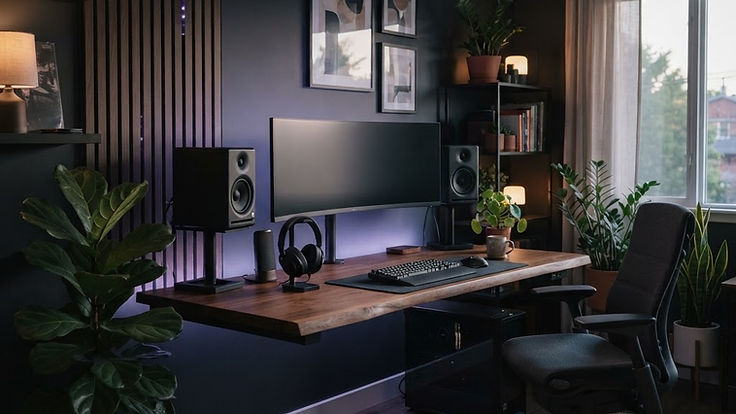
A gaming room is more than a desk and a screen. The colour of the walls affects how immersive your games feel, how comfortable your eyes are during long sessions, and how good your setup looks on stream. Yet most gaming rooms are painted whatever colour the room happened to be, then lit with bright RGB that fights against it.
As an interior designer, I approach a gaming room like any other room: start with how it will be used, then choose colours and lighting that support it. In this guide I'll share the best gaming room colour ideas, why darker walls often work best, how to pair paint with RGB lighting, and how to make a gaming setup look good in a shared room or a teenager's bedroom.
What Makes a Good Gaming Room Colour?
The best gaming room colours do four things:
- Reduce glare. Matt, mid to dark colours reflect less light onto your screen than bright white walls.
- Let the screen stand out. A darker backdrop makes the monitor feel more immersive, a bit like a cinema.
- Show off lighting. Coloured LED and RGB lighting looks richer against deeper walls.
- Suit long sessions. Calm colours are easier on the eyes and the mind than very bright or saturated shades across every wall.
The Best Gaming Room Colours
| Colour | Effect | Best for |
|---|---|---|
| Charcoal grey | Neutral, low-glare and modern | Any setup, especially with RGB |
| Navy and inky blue | Calm, focused and cinematic | Long sessions, streaming |
| Deep green | Rich, calming and natural | Cosy setups, mixed use rooms |
| Black or near black | Maximum immersion | Dedicated gaming rooms |
| Deep purple | Bold, atmospheric and playful | Teen rooms, RGB-heavy setups |
| Slate blue-grey | Softer and easier to live with | Shared rooms, bedrooms |
| Warm grey or greige | Calm and flexible | Living room setups |
| Two-tone dark and light | Defines the zone | Small rooms, bedrooms |
Charcoal grey
Charcoal is the safest choice for most gaming rooms. It's neutral, so any colour of RGB lighting looks good against it, and it reduces glare without feeling as heavy as black.
Navy and inky blue
Blue is associated with focus and calm, which makes deep navy one of my favourite gaming room colours. It looks cinematic with warm wood and lets blue, purple and white lighting glow. If you're drawn to blue, my review of Dulux Ink Well, a deep, muted navy, is a good place to start.
Deep green
Forest and bottle greens create a cosy, immersive feel that suits gamers who want the room to double as a den or study. Green pairs beautifully with wood, leather and warm lighting. See my guide to the best green paint colours for shades to try.
Black and near black
For a dedicated gaming or simulator room, black or a very dark charcoal gives maximum immersion. Use a matt finish and plenty of layered lighting so the room doesn't feel like a cave.
Purple
Deep purple is popular in gaming rooms because it complements the classic RGB palette. Use it on one wall or in a muted, smoky shade to stop it overwhelming the room.
Should Gaming Room Walls Be Dark or Light?
Darker walls are usually better for gaming because they reduce reflections and make the screen the brightest thing in the room, which feels more immersive. However, a fully dark room isn't always practical, especially in a bedroom or shared space.
A good compromise is:
- A dark wall behind the monitor, with lighter or mid-tone walls elsewhere.
- A dark lower half and lighter upper half, divided by a painted line or panelling.
- A dark colour drench in a small room, with warm lamps for everyday use.
Avoid glossy finishes on walls near screens, as they reflect light. Matt is best.
How to Choose Your Gaming Room Colour, Step by Step
- Decide how the room is used. A dedicated gaming room can go fully dark. A bedroom, office or living room needs a calmer, more flexible colour.
- Find the screen wall. The wall behind your monitor matters most, so start there. Choose a mid to dark matt colour to cut glare.
- Check the light. North facing rooms make colours cooler and darker, so a warm charcoal or green may feel more welcoming than a cold blue. South facing rooms can take cooler navies.
- Pick your lighting colours first. If you love blue and purple RGB, navy, charcoal and black are ideal. If you prefer warm, amber light, deep green and warm greys work better.
- Test samples at night. You'll mostly game in the evening, so look at paint samples under your lamps and LEDs, not just in daylight.
- Choose a durable matt finish. It reduces glare and stands up to chairs, desks and controllers knocking the walls.
- Plan the rest of the palette. Pick one main wall colour, one accent and one natural material such as wood. My step-by-step guide to choosing the perfect colour palette explains the method.
Pair Paint With Lighting
Lighting is just as important as paint in a gaming room.
- Bias lighting behind the monitor. A soft LED strip behind the screen reduces the contrast between a bright screen and a dark wall, which many gamers find more comfortable for long sessions.
- Choose a lighting colour scheme. Pick two or three lighting colours that suit your walls rather than cycling through every colour. Cool blues and purples suit navy and charcoal; warm white and amber suit green and wood.
- Add a warm lamp. A desk or floor lamp with a warm bulb makes the room usable for everything other than gaming.
- Avoid glare. Position the desk so windows and lamps aren't reflected in the screen. Side-on to a window is usually best, as I explain in my home office design ideas.
- Light the background for streaming. Accent lighting on shelves and a light behind the camera makes a stream look professional.
Gaming Room Design Ideas Beyond Paint
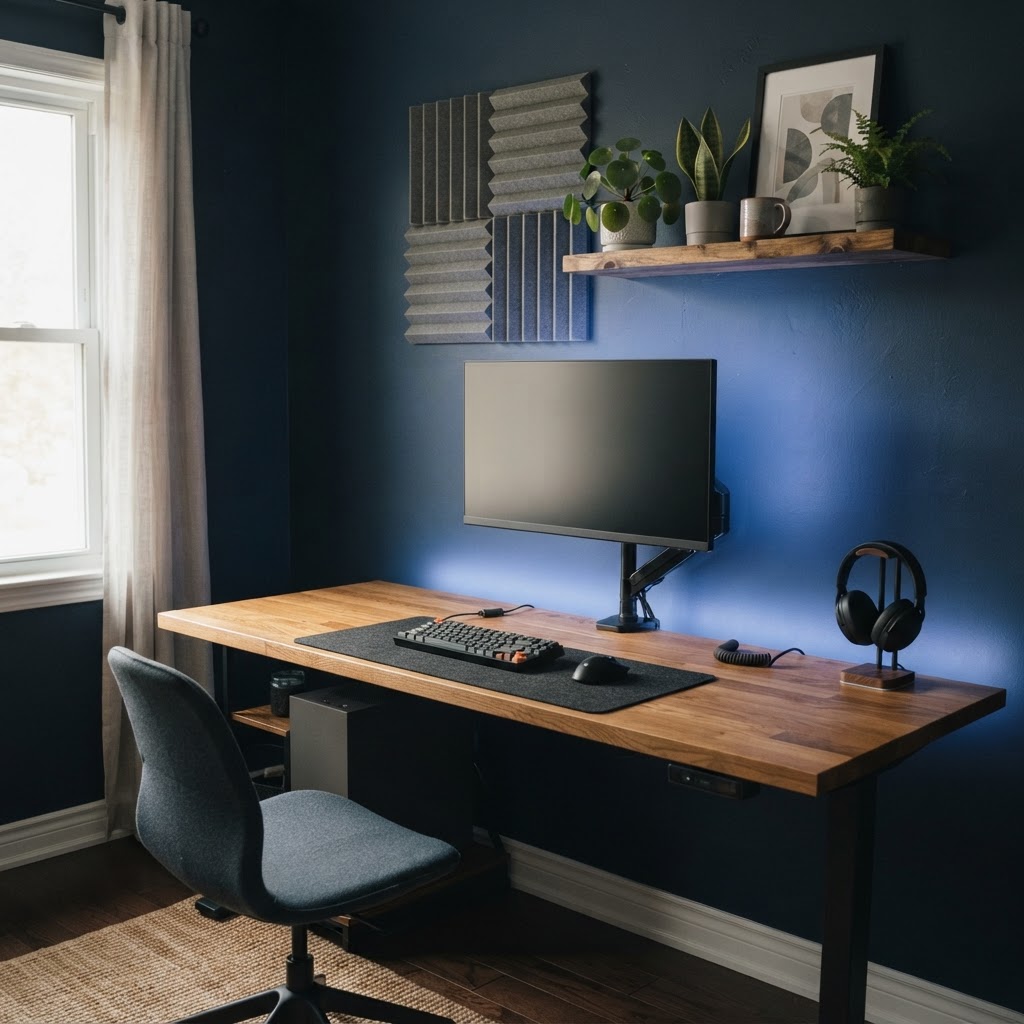
- Acoustic panels. Felt or wooden slat panels absorb echo, improve voice chat and can be arranged in patterns that act as wall art.
- A comfortable chair and desk. Ergonomics matter for long sessions. Aim for your screen at about arm's length with the top at or just below eye level.
- Cable management. Cable trays, clips and a single extension lead make even a dark room feel calm.
- Storage for controllers and games. Closed cupboards or drawers keep surfaces clear.
- Display shelves. Show off collectibles, figures or retro consoles on lit shelves.
- A rug. A large rug softens sound and makes the room feel finished.
- Art and posters. Frame prints properly rather than taping them up, and hang them at a consistent height.
- Plants. Low-light plants such as pothos, snake plants and ZZ plants cope well in darker rooms.
Gaming Setups in Shared Rooms and Bedrooms
Not everyone has a dedicated gaming room. In a bedroom, living room or spare room:
- Define the zone with a painted block of colour behind the desk, a rug or a bookcase.
- Keep the main room calm with softer colours and make the gaming wall the darker, bolder area.
- Choose furniture that blends in, such as a wooden desk rather than a bulky gaming desk.
- Hide the setup in a cupboard or behind doors if the room has to be restful for sleep.
In a small room, my small living room ideas show how to zone a compact space without it feeling cluttered.
Gaming Room Colour Schemes to Copy
Midnight navy
Navy walls, a walnut or oak desk, a charcoal chair, warm white lamps and blue bias lighting. Cinematic, calm and grown-up.
Stealth charcoal
Charcoal walls and ceiling, black furniture, oak shelves and a single lighting colour such as cool white or purple. Sleek, minimal and ideal for streaming.
Forest den
Deep green walls, leather or tweed chair, wooden desk, brass lamp and amber accent lighting. A cosy, study-like room that works for gaming, reading and working.
Neon purple
Smoky purple accent wall, charcoal elsewhere, black furniture and pink and blue RGB. Bold and atmospheric, popular in teenage gaming rooms.
Two-tone teen room
A dark slate blue lower half and a soft grey upper half, with a white desk and colour-changing lighting. It gives a gaming feel without making the whole bedroom dark.
Teenager's Gaming Bedroom Ideas
Teenagers often want bold colours, so let them choose an accent wall in their favourite shade and keep the rest of the room in a mid-tone neutral. Add RGB lighting on a timer, closed storage for clutter and a comfortable chair for friends. It gives them ownership of the room without a full redecoration when their tastes change.
Common Gaming Room Colour Mistakes
- Bright white walls that reflect glare onto the screen.
- Glossy paint near monitors.
- Too many saturated colours across every wall and every light.
- No warm lighting for non-gaming use.
- Forgetting the background on camera.
- Cluttered cables and surfaces that make the room feel chaotic.
Frequently Asked Questions
What is the best colour for a gaming room?
Charcoal grey, navy and deep green are the best all-round gaming room colours because they reduce glare, make screens feel immersive and work with most RGB lighting.
Should a gaming room be dark or light?
Darker walls usually work best, especially behind the monitor, because they reduce reflections and make the screen stand out. In a shared room, paint just the wall behind the desk in a darker shade.
What colour is best for focus while gaming?
Blues and greens are associated with calm and focus, so navy, slate blue and deep green are good choices for long sessions.
What colour LED lights go with navy walls?
Cool white, blue, purple and soft pink all look great against navy. Warm white also works well for a cosy, cinematic feel.
What paint finish is best for a gaming room?
Matt finishes are best because they reflect the least light. Use a durable matt or eggshell on woodwork and areas that get knocked.
What colour should I paint a small gaming room?
A deep colour drench across walls, woodwork and ceiling can make a small gaming room feel cosy and immersive. If you prefer a lighter feel, paint only the wall behind the desk in a darker shade.
Design a Gaming Room You Love
The best gaming room colour reduces glare, makes your screen the star, and suits the way you use the room. Start with a dark, matt wall behind the monitor, choose a simple lighting palette and add warm lamps, acoustic panels and good storage.
If you'd like help designing a gaming room, den or multipurpose space, you can book a one-hour online interior design consultation with me. For more colour ideas, see my step-by-step guide to choosing the perfect colour palette.
About the author
Magda Callery is a UK interior designer with more than 15 years' experience designing homes, pubs, restaurants and bars, and her expert commentary has featured in Homes & Gardens, The Mirror and The Spruce. Explore more of the interior design articles.
Continue reading

Home Office Design Ideas: A Designer's Guide for UK Homes
Home office design ideas for real British homes, from box rooms and alcoves to cupboard offices and garden rooms, with layout, lighting, colour, storage and video call tips from an interior designer.

Small Living Room Ideas: How to Make It Feel Bigger
An interior designer's small living room ideas: how to plan the layout, arrange furniture, choose colours and lighting, add storage and decorate so a small room feels bigger and cosier.

Japanese Soaking Tub: A Complete Guide to Ofuro Baths for UK Homes
Deep, compact and made for slow evenings: everything you need to know about Japanese soaking tubs, from sizes and materials to fitting one in a British bathroom and styling the room around it.